
Red Warning Screen Feature Coming to Google Chrome
Google Chrome is testing a new feature to prevent dangerous file downloads. With this new feature, if you attempt to download a harmful file, your screen will turn completely red, and you will receive a prominent warning. But under what circumstances will the entire screen turn red? Here are the…
 Samet Kelebek
Published 1 min read

Google Chrome is testing a new feature to prevent dangerous file downloads. With this new feature, if you attempt to download a harmful file, your screen will turn completely red, and you will receive a prominent warning. But under what circumstances will the entire screen turn red? Here are the details of Chrome’s red warning screen feature…
Google Chrome to Notify Dangerous Downloads with a Red Warning Screen
Google Chrome already implements security measures for downloads. Currently, when you try to download a harmful file, a warning window appears, showing a message in red text stating “Dangerous download blocked.” However, this new feature will display a full-screen red warning to emphasize the severity of the threat even more.
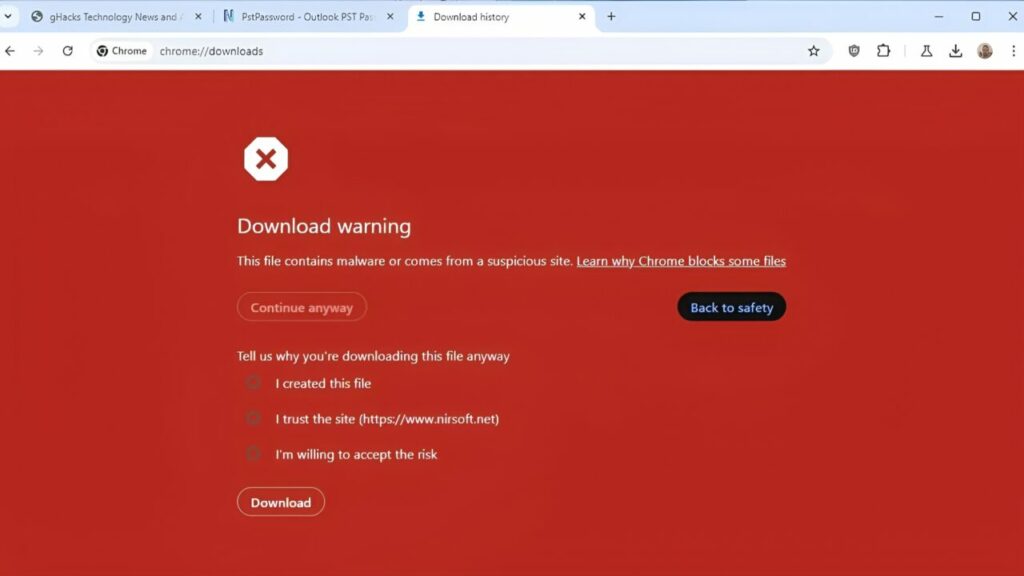
The red warning screen feature is currently being tested in Chrome’s Canary version. The Canary version contains the latest and most experimental features of Chrome. If the tests are successful, this feature will become available to all users.
Google, Microsoft and Nvidia join forces for AI
The red full-screen warning will work similarly to the existing full-screen warnings for phishing sites and malware. So, when you try to download a bad file, your screen will turn red, and you will be confronted with a large warning.
With this red warning screen, the default option will be “Return to Safe Browsing.” However, if you really want to download the file, you can proceed with the “Continue to Download” option. This new feature by Google aims to help users protect themselves from malicious software and dangerous downloads.
What do you think? Are such security measures necessary? Share your thoughts in the comments section below.