
Xiaomi Cloud will stop Gallery sync feature
Xiaomi made an official announcement about closing the Xiaomi Cloud Gallery sync feature. The exact date is unknown but it will happen within 2022. Xiaomi offers two options for how to save stored photos and videos. How to save stored photos and videos after removal of Gallery sync There are two…
 Senil Altuntaş
Published 2 min read

Xiaomi made an official announcement about closing the Xiaomi Cloud Gallery sync feature. The exact date is unknown but it will happen within 2022. Xiaomi offers two options for how to save stored photos and videos.
How to save stored photos and videos after removal of Gallery sync
There are two options for Xiaomi users to saving the already stored photos and videos. With the cooperation of Google, users can migrate their photos and videos to Google Photos. Users continue to have access to them through Google Photos. Unfortunately, Xiaomi does not provide unlimited storage on Google Photos. Customers who has data larger than 15 GB on Xiaomi Cloud have to purchase more space on Google Drive.

If you don’t want to move your data to Google Photos after Xiaomi discontinues the Gallery Sync, you can also store your data locally. These two options will be available throughout 2023 but there is no exact date for either. After 2023 All the existing Gallery data saved on Xiaomi Cloud will be deleted permanently.
What about the Xiaomi Cloud Memberships
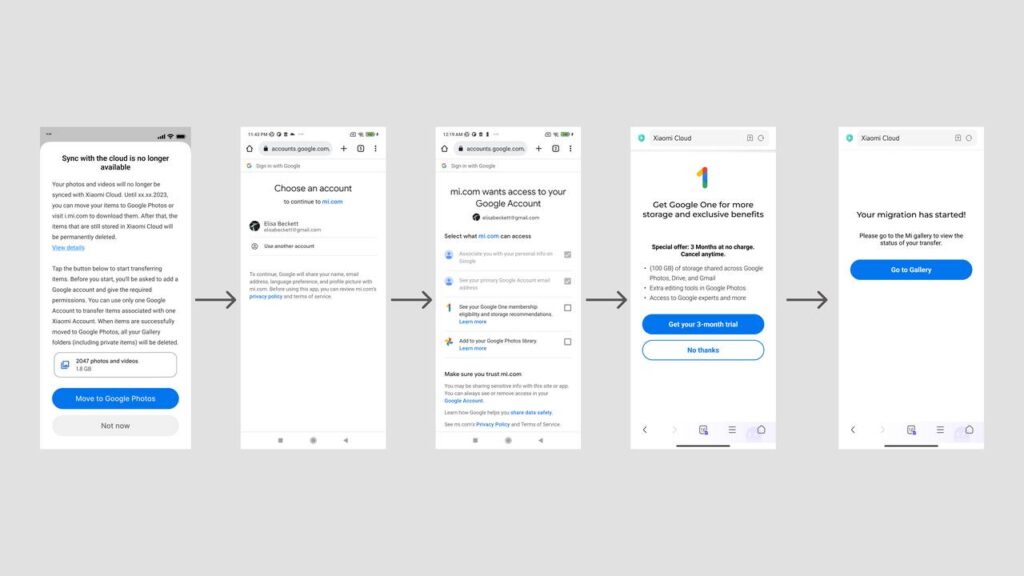
Xiaomi will cancel all Xiaomi Cloud memberships and users will be issued a full refund. However, the date for it is unknown. Also, the other features of Xiaomi Cloud, such as syncing and backing up other data (such as Contacts, Messages, and Notes) can still be used. Xiaomi has also shared a step by step guide about how you can transfer your data to Google Photos. Here is the guide and a visual.
- Click on the Move to Google Photos button Select the Google account you want to migrate
- Allow all relevant permissions
- Choose whether to accept the introductory membership trials provided by Google or upgrade space according to the amount of space required for the migration (if the current space is sufficient, the migration will start automatically)
- Back to Gallery app and check the migration status
What is your thought about the subject, you can share us in the comment section.