Gelir gelir.
Her yeni sürümde aynı heyecan.
Ama ben sadece heyecanlanıyorum.
İndirmeyeceğim.
Sizin yorumlarınızı bekleyeceğim.
Her yeni sürümde aynı heyecan.
Ama ben sadece heyecanlanıyorum.
İndirmeyeceğim.
Sizin yorumlarınızı bekleyeceğim.
Final sürüm mü gerçekten?EnziM dedi: ↑

Teşekkürler Enzim, linkleri ilk sayfaya ekledim.EnziM dedi: ↑
Henüz yok15M41L dedi: ↑Arkadaşlar DVD çıkmadı mı acaba ?
Çok sağol ne torrentten indiremedim bu işeme yaradı :thumbup1:Ve CD yansıları linux.org.tr sunucularında da yerini aldı..
http://ftp.linux.org.tr/ubuntu-releases/maverick/
teşekürler:DN3CAT1 dedi: ↑Evet final sürümü. Gönül rahatlığıyla indirebilirsin :)
Font sorunu yok, bu sürüme özgü güzel fontlar geldi çünkü..kavrak dedi: ↑deneyelim bakalım. umarım font sorununu düzeltmişlerdir

Linux Distributions
Ubuntu 10.10 Officially Released
October 10th, 2010, 10:54 GMT| By Marius Nestor
Ladies and gentlemen, dear Ubuntu users, after three alphas, one beta and a release candidate, we are pleased to announce that Ubuntu 10.10 is here, today (October 10th), available on mirrors worldwide (see the download links at the end of the article).
It is our greatest pleasure to introduce you guys to the highlights of this new release dubbed Maverick Meerkat. It all began on April 2nd, 2010, when Mark Shuttleworth announced the Maverick Meerkat operating system, the next major release of the popular Ubuntu Linux operating system.
Ubuntu 10.10 is also the twelfth release of the Ubuntu OS and, being an LTS (Long Term Support) release it will be supported for 3 years on desktops and 5 years on servers.
Under the hood of Ubuntu 10.10 (Maverick Meerkat):
· GNOME 2.32.0 desktop environment;
· Linux kernel 2.6.35.3;
· Nouveau video driver;
· X.Org 7.5;
· Xorg Server 1.9.0;
· Compiz Fusion 0.8.4;
· New artwork.
The Ubuntu 10.10 feature tour:
· Totally revamped installer - much easier to use, and
· 17 new wallpapers - from various photographers around the world;
· Improved default theme - the default Ambiance theme has been revamped and it looks amazing;
· Amazing new font - the default font has been replaced with a beautiful new one;
· Ubuntu One for Android and iPhone - it will allow users to easily sync their entire music collection to an Android-powered smartphone or an iOS 4 device from Apple;
· OneConf - enables users to easily sync multiple installed applications through multiple machines, via Ubuntu Software Center;
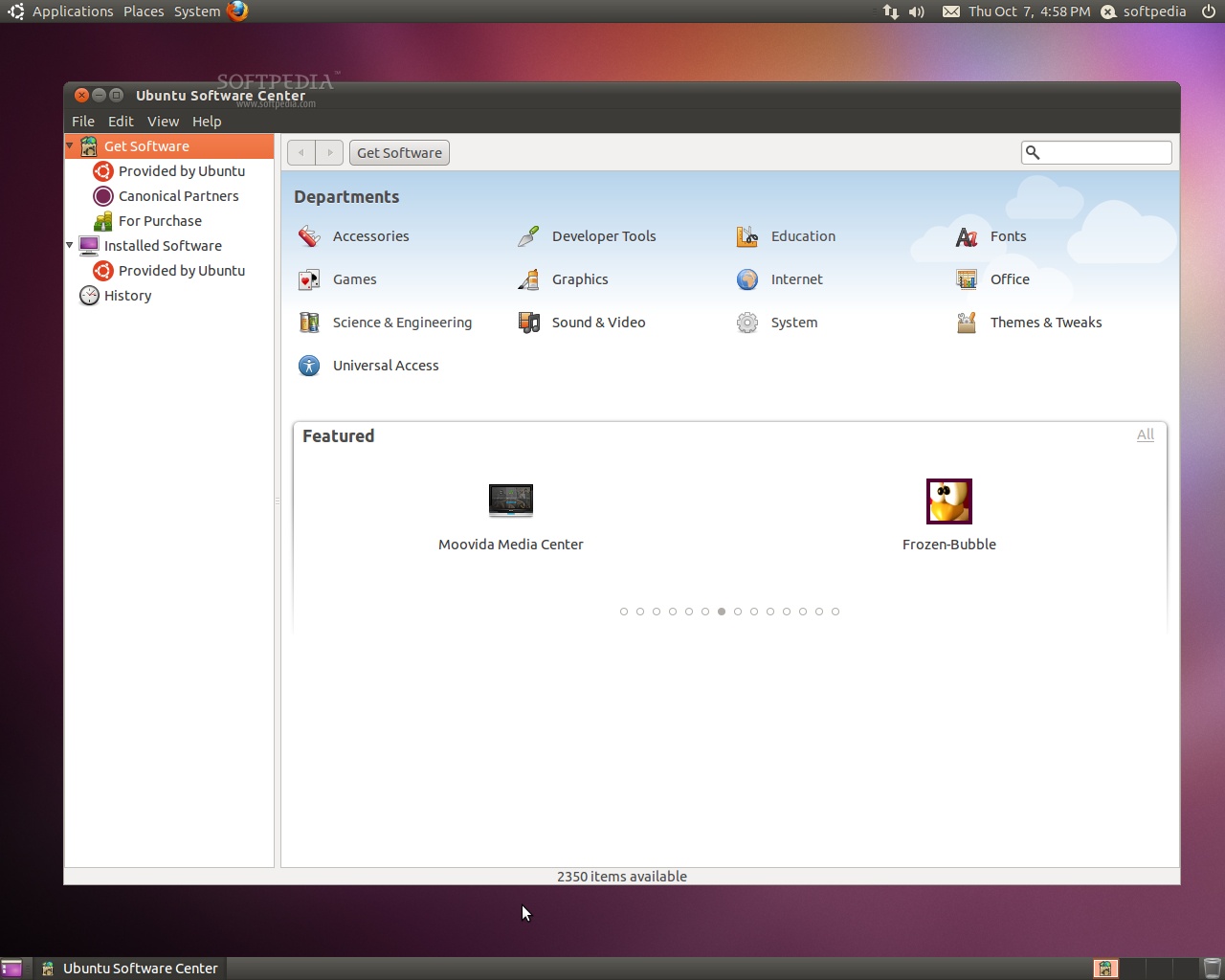
· Revamped Ubuntu Software Center - offers better descriptions, what's new section and other enhancements;
· Support for commercial applications - it is now integrated in the Ubuntu Software Center;
· Improved Calculator application - gcalctool has been totally revamped and it has powerful features;
· Revamped Indicator Applet - Volume control applet supports Rhythmbox now;
· Improved Computer Janitor app - it is now smarter and faster than before;
· Support for gestures with multi-touch - support for gestures, with multi-touch is possible via Ubuntu's uTouch 1.0 gesture and multi-touch stack.
Included applications:
Accessories:
· Calculator 5.32.0 (an arithmetic, scientific or financial calculator);
· Character Map 2.32.0 (permits to insert special characters into documents);
· Baobab 2.31.1 (disk usage analyzer);
· Search for Files (default system search application);
· Gnome Screenshot 2.32.0 (saves images of your desktop or individual windows);
· Gnome Terminal 2.32.0 (allows you to use the command-line);
· Gedit 2.30.3 (a small and lightweight text editor with intuitive spell-checker);
· Tomboy 1.4.0 (desktop note-taking application).

Graphics:
· Shotwell 0.7.2 (photo manager, RAW importer and editor);
· OpenOffice.org Drawing 3.2.1 (drawings, logos, flow charts creator and editor);
· Simple Scan 2.32.0 (scan, copy and fax images).
Internet tools:
· Empathy 2.32.0 (multi-protocol instant messenger);
· Evolution Mail 2.30.3 (powerful e-mail client);
· Firefox 3.6.10 (the ever-popular web browser);
· Gwibber 2.32.0.1 (a microblogging client);
· Vinagre 2.30.2 (remote desktop viewer);
· Terminal Server Client 0.150 (rdesktop, vncviewer, wfica, xnest frontend);
· Transmission 2.04 (lightweight BitTorrent client).
Office tools:
· Dictionary 2.31.1 (a tool to search word definitions and spelling in an online dictionary);
· Evolution Mail and Calendar 2.30.3 (powerful e-mail client);
· OpenOffice.org Suite 3.2.1 (spreadsheet, presentation and word processor).
Sound and Video:
· Brasero 2.32.0 (CD/DVD burning application);
· Totem 2.32.0 (DVD-Video, DivX, XviD, WMV, MOV player);
· PiTiVi 0.13.5 (movie creator and editor);
· Rhythmbox 0.13.1 (Last.fm, radio and music player/organizer);
· Sound Recorder 2.31.6 (audio recording tool).
System Administration Utilities:
· Computer Janitor 2.0.4 (a tool that removes obsolete files and cleans your system);
· Palimpsest Disk Utility 2.30.1 (disk drive management and configuration utility);
· Synaptic Package Manager 0.63.1 (install, remove and upgrade software packages);
· Ubuntu Software Center 3.0.4 (software installer/updater tool).
...and six entertaining games for all ages!
Download Ubuntu 10.10 (Maverick Meerkat) right now from Softpedia.
Download Ubuntu Netbook Remix 10.10 (Maverick Meerkat) right now from Softpedia.
Download Ubuntu Server 10.10 (Maverick Meerkat) right now from Softpedia.
Download Ubuntu Enterprise Cloud 10.10 (Maverick Meerkat) right now from Softpedia.
Download Ubuntu Studio 10.10 (Maverick Meerkat) right now from Softpedia.
Download Kubuntu 10.10 (Maverick Meerkat) right now from Softpedia.
Download Xubuntu 10.10 (Maverick Meerkat) right now from Softpedia.
Download Edubuntu 10.10 (Maverick Meerkat) right now from Softpedia.
Download Mythbuntu 10.10 (Maverick Meerkat) right now from Softpedia.
Download Ubuntu ARM 10.10 (Maverick Meerkat) right now from Softpedia.

Firefox 'ta Türkçe yazım denetimi kütüphanesi yok :(hayranim dedi: ↑Türkçe olsa idi daha anlaşılır olabilirdi.
Ubuntu kurdum güzel.
Aslında değişen pek fazla bir şey yok.
Firefox yzım denetimini nasıl TÜrkçe yapacağız.
Paylaşırsanız sevinirim.
Çerez tercihleriniz Sitenin çalışması için zorunlu çerezler kullanılır. Ölçüm ve reklam çerezleri yalnız onay verirseniz çalışır. Ayrıntılar