
Xbox update released! Four new features introduced
Microsoft has released its latest update for Xbox users, introducing four significant new features. This update is likely to please gamers as it includes some changes to the interface. Here are the details of the June Xbox update… June Xbox update: Better backgrounds and more Wi-Fi network support…
 Ahmet Safa
Published 2 min read

Microsoft has released its latest update for Xbox users, introducing four significant new features. This update is likely to please gamers as it includes some changes to the interface. Here are the details of the June Xbox update…
June Xbox update: Better backgrounds and more Wi-Fi network support
You can now display artistic game visuals (game art) on the background of your Xbox Home screen. Previously, we could only see game visuals with the default Xbox Home background. Now, you can keep your dynamic or normal background while also seeing game visuals.
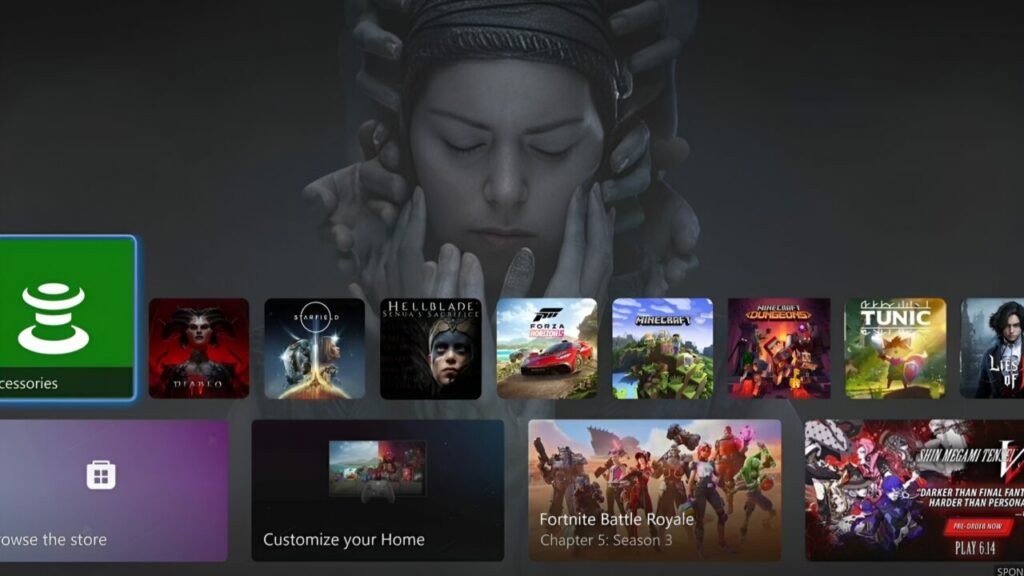
To enable this feature, go to your Xbox Settings menu, navigate to General > Personalization > My Background, and select the Show Selected Game Art option. Additionally, you can update your dynamic background color without changing your profile color.
Three new Xbox consoles introduced! Here are the prices
Moreover, the new update allows Xbox to remember up to 10 different Wi-Fi networks. This means you won’t need to re-enter network information and passwords each time you use your console in different locations. Extended USB accessory support has been added for the Xbox Adaptive Controller. Each port can now support up to 12 buttons, with the addition of a second stick and a hat switch. More stable audio connections will also be provided for headsets attached to the Elite Wireless 2 gamepad.
Microsoft is testing a new Xbox Home UI dashboard update that lets you enable game art backgrounds with any dynamic or regular background. Much better than having to use a default background to get the game art feature 👍 pic.twitter.com/DhdIGPZgCl
— Tom Warren (@tomwarren) April 29, 2024
Microsoft is making mouse and keyboard support accessible for everyone on Xbox Cloud Gaming. Additionally, players can now manage their game data and cloud saves themselves on browsers, the Xbox website, or Samsung TVs.
With these new features, Xbox aims to further enhance the user experience. What do you think? Will these new features be useful? Share your thoughts in the comments section below!